Coloring games: speed drawing
- 3.9
- Rating
- 1.00M
- Installs
- Free
- Price
 Analysis by App-foxy
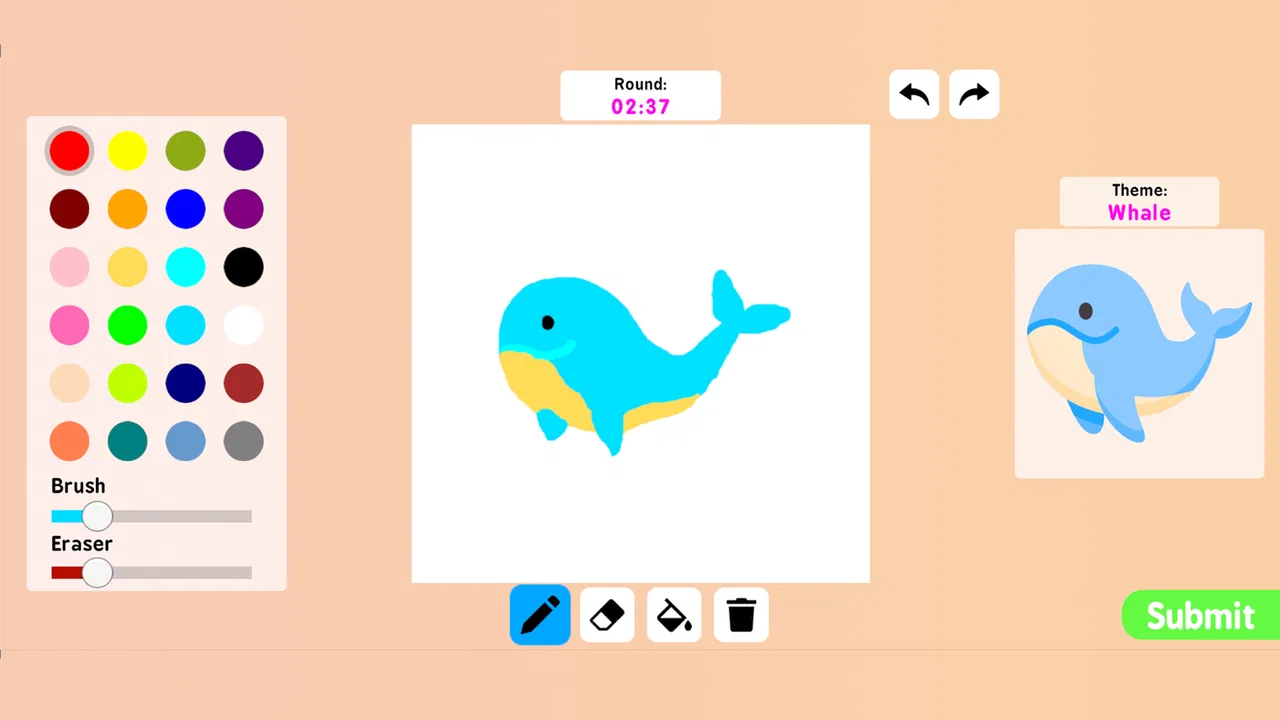
I spent time with Coloring games: speed drawing as a casual art app rather than treating it like a full digital studio. Its appeal is immediate: it lets you open a picture, add color, and experiment without needing drawing experience. The app sits in the Art & Design category, but its friendly, game-like approach makes it closer to a relaxed coloring activity than a professional illustration tool. That distinction matters, because the right expectations make the experience much more enjoyable.
The app is free, rated for Everyone, and made by Akarau Multiplayer online & offline io & car games. It has reached over one million installs and holds a 3.9 average from around two thousand ratings, so it has clearly found an audience, although the score also suggests that the experience will not suit every user equally. I see it as something to pick up for a short creative break, a simple activity with children, or a low-pressure way to explore color combinations.
How the app feels to use in different situations
I focus here on how the app’s quick, image-led coloring changes the feel of a short creative break. That structure can make it easier to begin than drawing from a blank canvas, though the best way to use it depends on whether you want calm experimentation or a livelier pace.
You May Also Like

 Blood Strike: 2.5 Anniversary
Blood Strike’s Loadouts Turn Every Drop Into a Tactical Gamble
A close look at Blood Strike’s custom loadouts: how fast access to signature weapons reshapes its battle royale rhythm, rewards preparation, and narrows the gap between fights.

 Pandora - Music & Podcasts
Pandora’s Music Is Easy to Start, but Harder to Recover
Pandora’s strength is its low-effort path from a seed to a station. Its weak spot is how much confidence it asks you to place in connection, setup, and quiet recovery.

 8 Ball Pool
 Is Built on Rivalries, Rematches, and Routine
A close look at the rivalries, rematches, shared routines, and unanswered safety questions that turn a quick pool match into a persistent mobile community.

 Samsung Music
’s Quiet Strength Is Playing What You Already Own
Its reach comes less from spectacle than from dependable access to a personal library. That simplicity is both the app’s strongest retention engine and its ceiling.

 AccuWeather: Weather Radar
AccuWeather Review: A Quick, Clear Forecast for Everyday Decisions
For everyday plans, the best forecast is the one you can understand quickly. AccuWeather makes rain timing, radar, and local conditions easy to act on, with a few trade-offs.

 Hill Climb Racing
Why Hill Climb Racing Still Turns Crashes Into One More Run
A tiny car, a bumpy hill and one more upgrade: Hill Climb Racing keeps resurfacing because its simple chaos makes every near-miss feel personal.
More From Our News Desk



Readability and navigation during a quick coloring session
The strongest part of the experience is how quickly the basic idea becomes understandable. You do not need to study drawing terminology or learn a complicated toolset before making progress. The central activity is visual, and that makes the app approachable for someone who normally avoids art software. If you have only a few minutes, you can get started without preparing a canvas or deciding on a project from scratch.
That simplicity is especially useful on a phone. A small screen is not ideal for detailed illustration, but it works well for tapping through a coloring activity. I found that the app makes more sense when I treat each image as a short session instead of expecting a complete creative workspace. The reduced commitment is part of its charm: there is less pressure to produce something polished.
Navigation is best understood through repeated use. Once you recognize where the coloring activity begins and how the available choices are presented, the process feels fairly direct. New users may still need a moment to understand the relationship between the speed-drawing idea and the coloring tools. The wording suggests more than one kind of creative interaction, so people looking for a traditional coloring book experience should allow themselves a little exploration before judging the app.
For younger users or anyone who prefers clear visual guidance, the lack of a demanding setup is helpful. On the other hand, people who want precise control over layers, brush behavior, or a carefully organized professional interface may find the experience too lightweight. The app works best when ease of entry matters more than detailed control.
I also recommend using it in short stages rather than rushing through every available activity. First choose a picture or drawing task, then test a few colors in an unimportant area, and only afterward commit to a larger section. This small habit reduces frustration and gives you a better sense of how the app responds to taps and gestures on your particular device.
Motor and sensory considerations
Coloring on a touchscreen can be comfortable for people who like direct interaction, but it is not automatically easy for every hand or every level of coordination. Small areas may require accurate tapping, and a finger can cover the part of the picture being edited. Users with limited fine-motor control may prefer larger, simpler images and slower, deliberate movements instead of trying to complete intricate sections quickly.
One practical approach is to rest the phone on a stable surface rather than holding it in one hand. That leaves the other hand free for controlled taps and reduces accidental movement. A stylus may also feel more precise for some people, although the experience will depend on the device and the individual. I would not assume that every stylus provides the same result, so it is worth testing before beginning a detailed picture.
The speed-drawing angle introduces a different kind of pressure. Some users enjoy the energy of working quickly, while others may find timed or fast-feeling activity stressful. If the pace starts to interfere with enjoyment, I would treat the drawing as a calm coloring exercise and focus on making steady choices rather than trying to finish first. The app is more inclusive when speed is viewed as an optional style of play instead of a test of ability.
Color selection also deserves attention. A palette can be enjoyable for people who think visually, but distinguishing similar shades may be difficult for users with color-vision differences. I found it more helpful to choose colors by contrast and personal preference than to depend on tiny differences between neighboring tones. Strong contrasts can make completed areas easier to follow and can reduce the need to inspect the screen closely.
Screen brightness is another everyday factor. A very bright display may cause discomfort during a long session, while a dim screen can make pale colors harder to distinguish. Adjusting brightness before starting is a simple improvement, especially for evening use. The app does not replace specialized accessibility software, but basic device settings can make the activity more comfortable.
For children, the direct touch format can be inviting, but supervision may still be useful. A child who taps quickly may move through an activity without noticing the visual result, while another child may become absorbed in choosing colors. The best experience depends on whether the goal is quiet concentration, playful experimentation, or practicing controlled hand movements.
Situational access for home, travel, and shared use
I can imagine using this app during a commute, while waiting for an appointment, or at home when I want something creative that does not demand a long attention span. A phone is easier to carry than a sketchbook and less intimidating than a desktop art program. That makes the app suitable for casual moments when opening a more advanced editor would feel like too much effort.
The developer’s name includes multiplayer and offline game terms, but I would avoid assuming that every session needs another person or a constant connection. The core appeal for me is the individual coloring activity. If you are planning to use it during travel, it is sensible to open it before leaving and check that the parts you want to use behave as expected in your situation. That is a better habit than relying on assumptions about connectivity.
On a small phone, the app is easiest to use when you can give it your full attention. In a crowded bus or while walking, accidental taps and glare can make detailed coloring unpleasant. A tablet would offer more room for touch interaction if you already own one, but I would still see this as a casual mobile activity rather than a substitute for a large drawing display.
It can also work as a shared, low-pressure activity. Two people can discuss color choices, compare approaches, or take turns with a picture. This is particularly useful when someone wants to participate in art without having to draw recognizable objects from a blank page. The coloring structure gives the session a starting point, while personal color choices leave room for expression.
For a parent or caregiver, the Everyone rating makes the app easier to consider for a broad age range, but an age label is not a complete guide to individual suitability. I would still try it first, check whether the interaction is comfortable, and decide whether the available visual pace fits the child or adult using it. The same app can feel relaxing to one person and demanding to another.
Where it differs from ordinary coloring books and art editors
Compared with a paper coloring book, the app is cleaner and more flexible in practical ways. You do not need pencils, markers, or a table, and changing a color choice is less permanent than covering paper with ink. That makes experimentation easier, particularly for users who hesitate to make mistakes. The trade-off is that a screen lacks the physical sensation of paper and may feel less satisfying to people who enjoy textured materials.
Compared with a general drawing app, Coloring games: speed drawing is much less intimidating. A blank canvas can be liberating for an experienced artist but uncomfortable for a beginner who does not know where to start. Here, the image-led approach gives you a defined task. The cost of that convenience is creative freedom: users looking for custom brushes, detailed composition work, or professional editing controls should choose a dedicated drawing application instead.
Compared with a coloring book app built around quiet, highly controlled filling, the speed-drawing identity may feel more playful and active. That can be a benefit for someone who loses interest in slow, repetitive coloring. It may be less suitable for a user who specifically wants a meditative pace with no sense of urgency. In that case, a simpler digital coloring book could provide a calmer match.
My advice is to decide what you want before opening it. If the goal is to relax with a quick visual task, it makes sense. If the goal is to create artwork for printing, build a portfolio, or learn formal drawing technique, it is the wrong tool. This is not a criticism; it is a matter of choosing an app whose structure matches the job.
Remaining barriers and everyday friction
The main limitation is the gap between casual accessibility and fine control. A beginner can understand the general activity quickly, but that does not mean every touch will feel precise. Small details, rapid interactions, and the physical size of a phone can work against users who need larger targets or more time. I would be cautious about recommending it as the only creative option for someone with significant motor or visual needs.
Another barrier is expectation. The store summary presents coloring, speed drawing, painting, and recoloring as related ideas, but a reader may imagine a broader design suite than the app actually feels like in use. I approached it as a collection of quick coloring-oriented activities, and that made the experience clearer. Anyone expecting the depth of a professional illustration program may be disappointed by the lighter structure.
The 3.9 average rating from around two thousand ratings reflects that mixed fit. I would not read it as a warning that the app is unusable, but I also would not treat it as universally polished. It is worth giving the app a fair trial with a simple picture before deciding whether its controls and pace suit you. A short test is more informative than judging it solely by its category.
It is also worth remembering that free apps can be appealing because they remove an upfront cost, but free does not necessarily mean frictionless. I pay attention to how comfortable I feel navigating, how much concentration a session requires, and whether the creative result feels worth the time. Those personal factors matter more here than comparing it with expensive professional tools.
The current version is 16, and the app runs on devices using Android 5.1 or later. That broad device compatibility is useful for people who do not have a recent phone, although actual comfort will still depend on screen size, touch responsiveness, and general device performance. A phone that technically runs the app may not provide the same ease as a newer device with a larger, brighter display.
Who I would recommend it to
I would recommend it to beginners who want guided creativity, children who enjoy color-based activities with suitable supervision, and adults looking for a short distraction that feels more constructive than passive scrolling. It is also a reasonable choice for someone who likes trying unusual color combinations without worrying about wasting paper or materials.
It may be useful in informal learning situations too. A teacher, parent, or caregiver could use a coloring session to talk about contrast, warm and cool colors, or the difference between following a visual guide and making a personal choice. I would keep the activity flexible rather than turning it into a performance test. The app is at its best when the user can explore without fear of getting the “right” answer.
I would skip it if you need advanced accessibility controls, highly precise illustration tools, a serious drawing curriculum, or a tactile art experience. I would also look elsewhere if fast interaction makes you anxious or if you prefer working from a completely blank canvas. A dedicated art editor, a slower coloring app, or traditional paper supplies may serve those needs better.
My inclusive verdict
After using Coloring games: speed drawing, I see it as an approachable Art & Design app with a casual, game-like personality. Its free entry, Everyone rating, and simple coloring focus make it easy to try, while its reach of over one million installs shows that the format has broad appeal. The developer, Akarau Multiplayer online & offline io & car games, has positioned it as something more immediate than a conventional art program, and that is where it makes the most sense.
My strongest recommendation is to match the app to the person, not just the category. Use larger images where possible, increase contrast when similar colors become difficult to distinguish, support the phone on a stable surface, and treat speed as a creative option rather than a requirement. Those small adjustments can make the difference between a frustrating session and an enjoyable one.
Coloring games: speed drawing is worth trying if you want accessible-looking, low-pressure coloring on a mobile device and are comfortable with the limits of touch controls. I would not present it as a complete solution for every ability or every art goal, but I do think it offers a friendly starting point for casual creativity. For me, its value comes from removing the blank-page problem while leaving enough room to make the colors feel personal.
FAQs for Coloring games: speed drawing
01What features does Coloring Games: Speed Drawing offer?
Coloring Games: Speed Drawing provides a wide range of features including an extensive palette of colors, a variety of brushes, and intricate designs to choose from. The app also offers speed challenges to enhance your drawing skills and unlock achievements. Users can save and share their creations directly through the app.
02Is Coloring Games: Speed Drawing suitable for all ages?
Yes, Coloring Games: Speed Drawing is designed to be user-friendly for all ages. With its intuitive interface and a range of difficulty levels, it caters to children, teens, and adults alike. The app ensures an engaging experience for everyone, providing fun and relaxation while drawing.
03Does the app require an internet connection to function?
Coloring Games: Speed Drawing can be used offline, allowing users to enjoy coloring anytime and anywhere without needing an internet connection. However, an internet connection is required for initial download, updates, and sharing features. This flexibility makes it convenient for users on the go.
04Are there any in-app purchases available?
While Coloring Games: Speed Drawing is free to download, it does offer optional in-app purchases. These purchases may include premium color palettes, exclusive designs, and advanced tools. Although the basic version is comprehensive, these extras can enhance your coloring experience.
05How does the speed drawing challenge work in the app?
The speed drawing challenge in Coloring Games: Speed Drawing is a feature where users can test their skills against the clock. Players are prompted to complete a drawing within a set time limit, making it a fun and exciting way to improve speed and precision. Successful completion of challenges often leads to rewards or unlocks.
Pros
- User-friendly interface enhances creativity.
- Wide variety of coloring tools available.
- Regular updates with new content.
- Offline mode for uninterrupted use.
- Encourages relaxation and mindfulness.
Cons
- Ads can be intrusive during use.
- Limited free content without subscription.
- Occasional app crashes reported.
- Requires significant storage space.
- Color choices can be overwhelming.

Coloring games: speed drawing
Gallery